California forwarding server (fw3.sshreach.me) was down for a little over an hour
2 months agoStarting at 17:07:22 UTC today, our California forwarding server, fw3.sshreach.me, went down. Users routed through fw3 would have seen their connections drop or fail to establish during this window.
The cause was a failing hardware component on the physical host. Our provider caught it quickly and swapped the hardware right away — the server was back up and passing traffic normally by 18:25:58 UTC, putting the total outage at 1 hour, 18 minutes, and 36 seconds.
Everything has been stable since, and we've confirmed forwarding through fw3 is behaving as expected.
We know any downtime on a forwarding server is disruptive, especially if you had an active session riding through fw3 at the time, and we're sorry for the interruption. We'll keep an eye on the replaced hardware over the next few days to make sure it holds up.
Warm regards, The sshreach.me team
California forwarding server is currently down...
2 months agoWe are currently experiencing problems with our california server - our hosting provider is working on the issue.
Client script update: quieter logs, calmer reconnects
2 months agoWe've pushed a new version of the sshreach.me client scripts. If you're on the socket or websocket client you'll see 627 in your client list; the legacy Python 3 client moves to 415. Clients that support in-place upgrades will pick it up on their own, and everyone else will see the usual prompt.
Most of what's in this release is about how the client behaves when something upstream isn't quite right. None of it changes how tunnels work day to day.
Log files that stay a sensible size
The client keeps a log next to itself, sshreachme.log. Until now it rotated once a day and otherwise just kept going — which is fine when there isn't much to say, and less fine when the client has something to say very often. A client that can't reach us will tell you so, repeatedly, and on a machine that's been struggling for a long stretch that file could reach a size nobody wants to discover on their disk.
So, two changes.
Rotation is now by size rather than by date. The log starts a new file once it reaches a few megabytes and keeps a handful of older ones, so the total is bounded no matter what happens. Every line is timestamped anyway, so nothing is lost by not having one file per day — and on a quiet client you actually end up keeping rather more history than before.
The client also collapses repeated messages. If the same line would otherwise be written over and over, it's written once, and when something different finally happens you'll see how many times the previous message repeated alongside it. The interesting part of a log is usually the moment things changed, and that moment is now easy to find instead of being buried under thousands of identical lines.
If you have old dated log files lying around from the previous scheme, the new client won't tidy them up for you. They're safe to delete whenever you like.
Reconnecting at a more sensible pace
When the client loses its connection, it retries. That's the right instinct, but it was going about it with more enthusiasm than most situations call for — and in a few corner cases it could end up retrying in a way that was never going to get anywhere.
The reconnection path has been reworked so that each attempt starts from a genuinely fresh connection, and so that failures which clearly aren't going to clear in the next few seconds are given a little more room before the next try. Brief network blips are handled exactly as quickly as they always were. If your link drops for a moment, you won't notice any difference.
Certificates
The servers your clients connect to use certificates that are renewed periodically. Renewals are routine and normally invisible, but a recent one didn't go as smoothly as it should have, and some clients had trouble connecting for a while as a result.
We've made some changes to address that.
On the client side, the script now recognises a certificate problem for what it is. A certificate that isn't accepted isn't something a client can fix by trying again immediately, so rather than reconnecting at full speed it settles into a slower rhythm and waits it out. When the certificate is sorted, the client picks up again on its own — no restart, nobody logging into anything. That last part is the one worth upgrading for: a client on this version gets itself back without you knowing there was anything to get back from.
Getting the update
If your client supports automatic upgrades it'll update itself shortly. Otherwise, download the script again from your client list and replace the one you're running. Your keys and settings are unaffected either way.
We’ve added server-side connection breakup
1 year agoWe’ve just rolled out a small but important reliability update: server-side connection breakup.
When a user clicks Disconnect, the client normally tears down the tunnel. But on unstable networks, that message might never reach the server — leaving “ghost” sessions alive until timeout.
Now, if the client fails to close the link within a short window, our servers will step in and terminate the connection from their side.
How we fixed it
We updated our server architecture so that:
-
When you send the “disconnect” command from your client, the server logs that intent immediately.
-
If the client connection becomes unresponsive or cannot close cleanly within a short grace period, the server forcibly tears down the session from our end.
Why this matters
-
No more lingering sessions. When you say disconnect, it actually disconnects — even over flaky Wi-Fi or mobile links.
-
Cleaner resource handling. Stuck sessions are cleaned up immediately.
-
User experience: You no longer need to double-check or manually intervene when the network hiccups. Press “stop”, and you’re stopped.
-
Future-proofing: Networks will get more heterogeneous (5G, WiFi 6E, satellite, mobile roaming). Ensuring robust disconnect semantics is a step toward better reliability under all circumstances.
This enhancement is part of the ongoing work to tighten up the edge-cases — the ones only triggered when the network does funny things. We hope you’ll notice fewer “ghost” sessions, clean cut-offs when requested, and an overall smoother experience.
Thank you for using the service and for your feedback — it helps us fine-tune features like this for real-world conditions.
Warm regards,
The sshreach.me team
Even more efficient client script
1 year agoOne year ago we have introduced our websocket-based python script for our users with metered connection. Websocket-based script was using only around 4MB per day as opposed to our https based script that was consuming up to 100 MB per day. The drawback was that it needed at least python 3.6 or newer to run.
We have now completely rewritten our server and also alongside changed the python client so that our new python client (version 620 and above) uses less than 1 MB per day (around ~400 kb per day)! The new client script uses less than 4x data than the previous one and almost 200 times less than the https one.
When downloading python script for your client you can now choose between 3 python scripts:
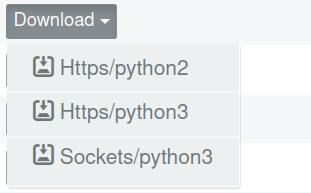
As with the previous client the question which script to use depends on your setup. If you only have python 2.7 on your system then the answer is the obvious - use the https/python2 script.
If you have python 3 or newer, you can choose between https and sockets script version. In that case please refer to the "Which client script should I use?" question on our faq page.
Two small UI enhancements and a better logging
1 year agoUI changes
sshreach.me now offers two small UI changes:
1. you can now see for how long the tunnel has been switched on for
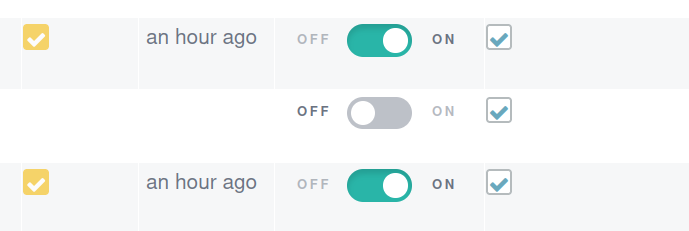
2. If you have more than 50 clients you can now choose how many clients are shown per page

Better logging:
New client script (version 612 and above) now offer better logging in cases when ssh can not open a tunnel. When that happens a red exclamation mark will appear next to the client name.

Clicking on the exclamation mark will take you to the log page for the chosen client where all reported ssh errors will be shown:

The access for the client's log page is also available from the "Info" tab on the client list page, by clicking on the icon in the "log" row.
Part of our service was down for 24h
2 years agoUsers of our websocket-based python script could not access their clients for around 24 hours - since Jul 4, around 20:00 hours until we renewed it more that 24 hours later. Through an unfortunate series of miscommunications among colleagues, one of our subdomains had an expired certificate and we didn't notice it until it was too late. That caused our websocket-based python script to fail to connect to our server and those clients were marked as offline until we renewed the certificate. The websocket-based service is now back online and we are doing the post-mortem analysis in order to prevent such failures in the future.
We apologize to our clients who were affected by the outage.
Optimizing Client Python Script for Efficient Data Usage
3 years agoIn today's digital age, internet usage is a critical consideration, especially for clients with limited bandwidth. We've taken a significant step towards optimizing data consumption by developing an enhanced version of our client Python script. This new version operates within a minimal data footprint of just 4MB per day, a great improvement over the previous version that consumed over 100MB daily.
When we launched this service, the fundamental idea was that a single client script could run anywhere, regardless of the operating system and Python version. However, the downside of this approach was the substantial amount of data being transferred. Unlike the older version, which relied on the HTTP protocol, our updated Python script leverages websockets to transmit and receive data more efficiently. This transition to websockets has drastically reduced the amount of data required for seamless communication, making it an ideal solution for clients with limited internet bandwidth.
Security remains a top priority in our development process. Despite the shift to websockets, the newer version of our Python script upholds the same robust security standards as its predecessor. We've ensured that Transport Layer Security (TLS) protocol is implemented, maintaining data integrity and confidentiality during transmission.
It's important to note that the minimum Python version required to run the new script is 3.6. However, we understand that some clients may still be using older versions of Python. To accommodate them, the previous version of the client script will continue to be accessible and functional. This ensures a smooth transition for clients who have yet to update their Python installations.
For clients equipped with newer Python versions and are on a metered connection, we highly recommend using the new version of our Python script.
introducing new API call: delete_client
3 years agoDear clients,
with the introduction of new delete_client API call you can now delete your client using only your automation scripts, with no need to use our web dashboard. For details on how to use the delete_client API call please consult our documentation.
Enhanced Security: Introducing Personalized Public/Private Key Pairs
3 years agoDear clients,
We have added an essential security feature to our services. Each client now can have their own unique public/private key pair, ensuring an enhanced level of data protection. Key pairs can be generated on the client by our client script thus ensuring that the private key never leaves the client, or you can upload the key using our dashboard or directly from the client. For more information please read the documentation here